
EjsS Reader - Google Play
You'll be able to see results in few seconds.
Publisher Description
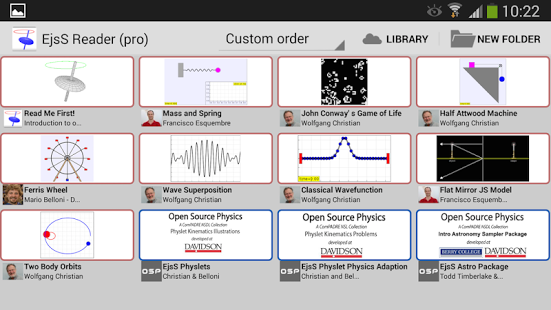
The EjsS Reader Pro allows you to organize and run science or engineering simulations, created with EjsS. The simulations (also referred to as models) are organized in a directory-like structure and displayed using a simple click and swipe interface,
Selecting a simulation displays its description and simulation pages. You can navigate through the pages by swiping your finger on the screen. Double clicking within a simulation page shows tabs for easy navigation. Simulations can be reordered by dragging or sorted by name or author. Simulations can be organized into file folders and search for by title or author.
A number of example models are included in the Reader application but additional models can be downloaded directly from the Open Source Physics (OSP) collection in the NSF-sponsored ComPADRE National Science Digital Library. You can also load simulations from mail attachments or from a local file system.
From the home screen of the EjsS Reader you can press and hold a model or folder icon to bring-in a task bar with options, such as creating a new folder, removing a simulation or folder creating a new folder. Dragging a simulation icon to an existing folder moves it to that folder and pressing the “Back” button moves it to the previous (parent) folder.
EjsS stands for Easy Java(script) Simulations (http://www.um.es/fem/EjsWiki) and is a free authoring tool written in Java that helps non-programmers create interactive Java and JavaScript simulations for teaching and learning. EjsS has been developed by Francisco Esquembre at the University of Murcia (Spain) and is part of the Open Source Physics (http://www.compadre.org/OSP/) project. The EjsS and OSP collection were recognized with the SPORE Prize in November 2011 by the Science magazine.
About EjsS Reader
The company that develops EjsS Reader is UNIVERSIDAD DE MURCIA. The latest version released by its developer is 1.0 .
To install EjsS Reader on your Android device, just click the green Continue To App button above to start the installation process. The app is listed on our website since 2014-07-01 and was downloaded 0 times. We have already checked if the download link is safe, however for your own protection we recommend that you scan the downloaded app with your antivirus. Your antivirus may detect the EjsS Reader as malware as malware if the download link to org.colos.ejssreader.pro is broken.
How to install EjsS Reader on your Android device:
- Click on the Continue To App button on our website. This will redirect you to Google Play.
- Once the EjsS Reader is shown in the Google Play listing of your Android device, you can start its download and installation. Tap on the Install button located below the search bar and to the right of the app icon.
- A pop-up window with the permissions required by EjsS Reader will be shown. Click on Accept to continue the process.
- EjsS Reader will be downloaded onto your device, displaying a progress. Once the download completes, the installation will start and you'll get a notification after the installation is finished.
Program Details
System requirements
Download information
Pricing
Version History
version pro
posted on 2014-07-01
- Fix bug related to reading models in external memory.
Disclaimer
Official Google Play Link
We do not host EjsS Reader on our servers. We did not scan it for viruses, adware, spyware or other type of malware. This app is hosted by Google and passed their terms and conditions to be listed there. We recommend caution when installing it.
The Google Play link for EjsS Reader is provided to you by apps112.com without any warranties, representations or guarantees of any kind, so access it at your own risk.
If you have questions regarding this particular app contact the publisher directly. For questions about the functionalities of apps112.com contact us.
